What is happening?
You have selected BIG Phone as the default phone app in Android system settings. When someone calls you, the phone rings, but the screen may stay black or Android may fail to show the incoming call screen.
This happens most often on Xiaomi phones with MIUI, but similar restrictions can also appear on other Android brands. Use the steps below in order.
1. Allow BIG Phone on the lock screen
On many phones, this is the main fix.
Open Installed apps
Open Android Settings and choose Installed apps.

Choose BIG Phone for Seniors
Open BIG Phone for Seniors in the apps list.

Open Other permissions
Tap Other permissions.

Enable the call-screen permissions
Allow Show on Lock screen and Start in background.

2. Allow Modify system settings
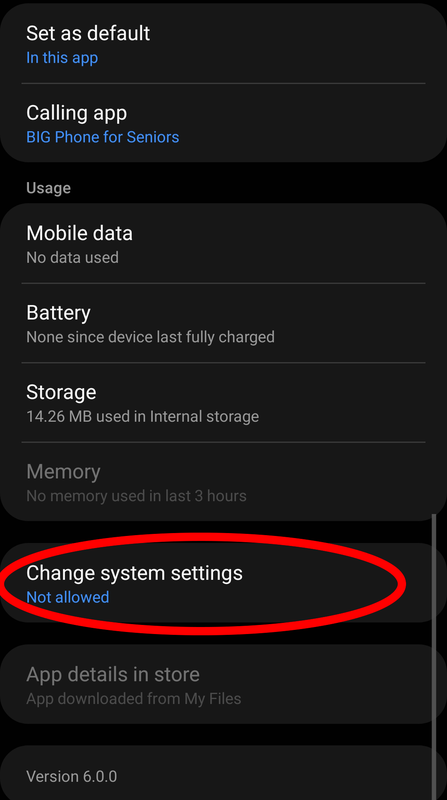
If Android shows Modify system settings or Change system settings, allow it for BIG Phone for Seniors. Repeat for BIG Launcher if the same permission is available.
Open Change system settings
In the app settings, tap Change system settings.
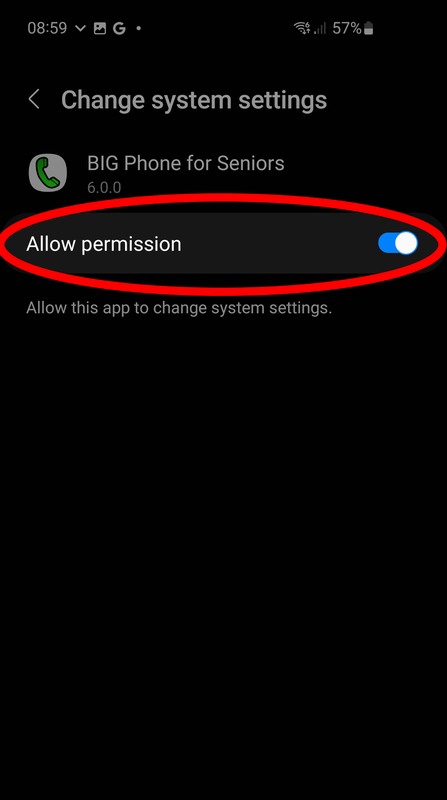
Allow permission
Turn on Allow permission.
3. Check the remaining restrictions
- Confirm that BIG Phone is still the default phone app.
- Disable battery optimization or battery saver restrictions for BIG Phone.
- Allow notifications for BIG Phone, including lock-screen notifications if Android asks.
- Restart the phone.
- Test an incoming call.
For background on Android manufacturers killing apps, see dontkillmyapp.com.
4. If it still fails: disable the Android lock screen
Use this only if it is acceptable for the phone not to use an Android screen lock.
Frequently asked questions
Why does the screen stay black when BIG Phone receives a call?
Android may be stopping BIG Phone in the background. Then BIG Phone cannot wake the display or show the incoming call screen.
Which BIG Phone permissions should I check first?
Check Show on Lock screen and Start in background first. If Android also shows Modify system settings or Change system settings, allow it for BIG Phone for Seniors and BIG Launcher.
What should I try if the call screen still does not appear?
Confirm that BIG Phone is still the default phone app, disable battery restrictions, allow notifications, restart the phone, and test an incoming call. If it still fails, use the last-resort lock-screen method below.
Still need help?
Contact us and include your phone brand, Android version, and which settings above you checked.