



Finally. A Phone Your Parents Can Actually Use
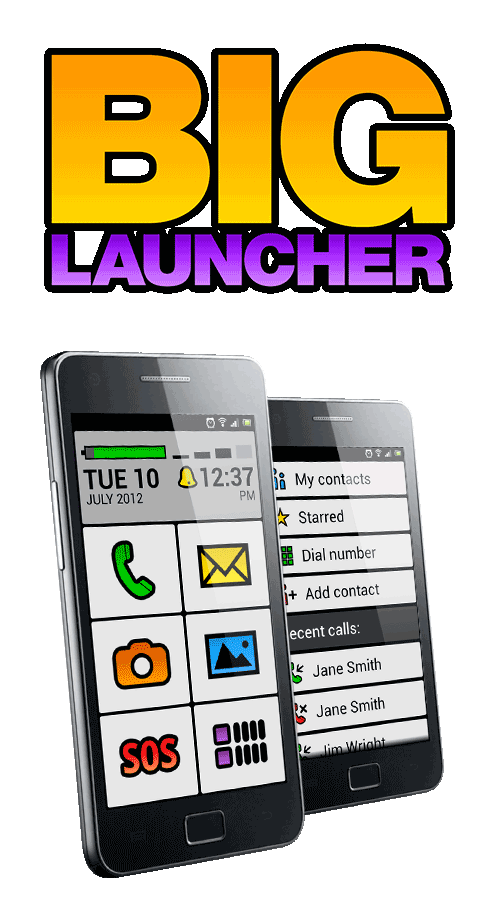
BIG Launcher turns almost any Android into a huge-button, impossible-to-get-lost phone. No new hardware. Set up by you, used by them — without the daily help calls.
“Dad called me four times today. He got lost in the menus again.”
Sound familiar?
You've tried everything — bigger fonts, Samsung Easy Mode, walking them through it three times. They're still lost. Or worse: the phone is in a drawer.
The phone wasn’t built for them
Android was designed for people who grew up swiping. Your parent didn’t. It’s not their failure — it’s a design mismatch.
Every tap feels risky
Fear of “breaking something” turns every action into anxiety. So they don’t use the phone at all — or they call you. Again.
Senior phones? Another phone to buy
Doro, Emporia, Jitterbug — new hardware to pay for, sometimes a monthly plan, and an unfamiliar phone your parent has to learn.
What if the phone they already have was the right phone — with the right interface?
Set It Up Once. Then You’re Done.
No new phone to buy. BIG Launcher transforms the Android they already own.
Install in Two Minutes
Download BIG Launcher free from Google Play. Works on their existing Android — no account needed, no new hardware.
Make It Theirs
Add contacts as big photo buttons. Put WhatsApp, camera, and calls on the home screen. Hide everything else. Lock the settings with a password.
They Use It. You Relax.
A clear home screen they understand instantly. No more wrong buttons, no more fear, no more daily calls for tech support.
I set up a phone for my mother who is 91. There was zero chance I could teach her how to use a smart phone so I really needed something like this. … The support videos made it easy for me to customise the interface for her.
— Milica Tadic · Google Play review
Why It Actually Works — When Everything Else Failed
Bigger text was never enough. The problem isn't size — it's complexity.


They tap the right button. Every time.
Buttons are so large and spaced far apart that trembling hands and blurry vision are no longer a problem. No accidental taps. Just what they meant to press.
Impossible to get lost
No swipe gestures. No long-press menus. One touch takes them where they want to go. They always know where they are.
SOS — help is one tap away
One tap on the red SOS button texts their location to the family and calls you on speakerphone. No typing, no explaining where they are.
Works on the phone they already have
That Android in their drawer? Perfect. BIG Launcher runs on almost any Android phone — even older ones. No new hardware needed.
They can't accidentally break anything
You control what's visible: call, messages, WhatsApp, camera. Everything else is hidden. No more wandering into the wrong settings.
Set up by you. Locked with a password.
You configure everything, then lock the settings with a password. Your parent uses the phone freely without undoing your setup.
15 Years. 2 Million Downloads. One Mission.

“With the paid dedicated dialer and messaging app, BIG Launcher is an almost perfect launcher for seniors.”

“The app does an effective job of increasing size and contrast … while at the same time maintaining a clean and easy-to-use design.”

“This ingenious app replaces the stock home screen with one that’s large, easy to read, and easy to operate.”

BIG Launcher started in 2011 because Jan couldn't find a phone his own mother could use. Fifteen years later, that's still our mission. We've never pivoted and we don't chase trends: we read what families write to us, answer them ourselves and build what they ask for. We just make Android work for everyone.
— Dan & Jan, Creators of BIG Launcher, Czech Republic
What Families Are Saying
From 8,000+ Google Play reviews
“I just set up a phone for an elderly relative who never had a mobile phone before. He found it intuitive and easy to use. … They are intended to be simple for the user, but behind that simplicity they are powerful.”
“Absolutely the BEST launcher suite for the elderly/non-smart phone savvy and is worth every penny! I have installed it on every one of my mom's phones.”
“My eyesight has deteriorated … and I'm amazed that I can use the phone again without reaching for my specs. Developer was quick to respond and very helpful restoring the licence.”
“My 76 year old mother-in-law has been using this launcher for like the last five years and she LOVES it! … Customer service is fantastic as well. I highly recommend this launcher for seniors.”
“I bought the pro version in 2016 and I could not get it working on my mother's new phone. Contacted the support email and I had it running within minutes. As for the application itself, for me it's perfect.”
“… enjoy using this launcher - clean, simple, reliable, well thought through & executed & fast too. … Surprisingly customisable once you learn your way around. They even provide a comprehensive users manual - who does that!”
“BIG Launcher continues to be exactly what is needed to allow my parent the freedom to navigate their device … I recommended this in 2025 and we'll continue to do so!”
“As someone who is visually impaired this app is amazing and is now my permanent home screen. … Really impressed.”
“A brilliant experience! Daniel at Customer Support was available day and night and he answered a couple of questions immediately.”
“This app has made it possible for my 90 year old mother to cope with a smartphone. The developer is also extremely helpful when contacted. I highly recommend buying it.”
“Great help. I have low vision and have used this since 2011.”
“Awesome application for seniors, really simplifies the usage. The free version is a little bit limited, but with the full version it shows the full POWER!”
One Suite. Everything They Need.
BIG Launcher handles the home screen. BIG Apps Suite PREMIUM adds BIG Phone and BIG SMS for simpler calls and messages, plus BIG Notifications for large, easy-to-read alerts — all with the same oversized, high-contrast, one-touch design.
Try any of the five apps for free. Upgrade only what you need.

BIG Launcher
Your new home screen
Replace Android's confusing interface with big, clear buttons your parent can't miss. Layouts from 15 buttons down to one, an SOS button that sends GPS by SMS, and a password that locks the settings.
- Huge buttons — layouts from 15 buttons (3×5) down to a single button
- SOS sends GPS location by SMS to your pre-set contacts
- Password lock keeps settings safe from accidental changes
- Hide distracting apps — show only what they need
- Big battery indicator, blinking buttons for missed calls, names read aloud on a long press
- 70 languages · themes and icon packs · runs on almost any Android, even old ones


BIG Phone
Easy to use phone and contacts
Large contact photos, one-tap dialing, and a caller ID display so clear they'll always know who's calling. No menus to navigate, no tiny icons to decipher.
- One-tap calling from large photo contacts
- Full-screen caller ID with photo on incoming calls
- Large-print call log — no squinting at recent calls
- Easy contact search with big, readable results


BIG SMS
Messaging editor with large fonts
Extra-large fonts, a simple thread view, and a send button big enough to hit on the first try. Text messages shouldn't require reading glasses.
- Extra-large font in every conversation
- Simple thread view — one conversation at a time
- Big send button — no more tapping the wrong thing
- Clear notification alerts for new messages


BIG Notifications
Make all the Android notifications really big
Android notifications are tiny and vanish in seconds. BIG Notifications turns every alert into large, high-contrast text that stays on screen until they've read it.
- Makes ALL app notifications large and readable
- Notification log — scroll back through what they missed
- Works with every app already on the phone
- High-contrast display cuts through the clutter


BIG Alarm
Alarm as simple as possible
An alarm clock that's easy to set and impossible to sleep through — with buttons big enough for half-awake hands and a display visible from across the room.
- Set an alarm in two taps — not ten
- High-contrast display visible across the room
- Big snooze button for groggy mornings
- Colorful themes that are easy on the eyes
BIG Launcher, BIG Phone and BIG SMS are free to try. Choose a monthly, yearly or lifetime plan for one app—or unlock all four with BIG Apps Suite PREMIUM. Pricing varies by country and is shown on Google Play.
Compare plans for one app and BIG Apps Suite PREMIUM in your country. →
One App. Many Lives Changed.
BIG Launcher was built for seniors — but anyone who needs a simpler phone deserves one.
Low Vision & Blindness
Macular degeneration, glaucoma, diabetic retinopathy — buttons big enough to see and TalkBack support that actually works.
Stroke & Motor Impairment
Oversized touch targets and zero swipe gestures. Trembling hands hit the right button on the first try.
Dementia & Cognitive Decline
No menus to remember, no gestures to learn. Photo contacts mean they tap a face — not a name they might forget.
Anyone Who Wants Simplicity
Kids with their first phone. Workers in gloves. Digital minimalists. Anyone who believes a phone should just be a phone.
Common Questions
Does BIG Launcher require buying a new phone? +
No. It works on almost any Android phone or tablet — even older ones. If they already have an Android, install it today.
What about iPhone? My parent has an iPhone. +
BIG Launcher is Android-only — Apple doesn't let any app replace the iPhone home screen. If the iPhone is too complicated for your parent, an affordable Android phone with BIG Launcher is the easy fix: big buttons, photo contacts and SOS, set up by you in minutes.
Does it work with WhatsApp, Facebook, and other apps? +
Yes. Any app can be placed on the home screen as a large, labeled button. BIG Launcher doesn’t change what’s inside other apps — no app can do that — but it simplifies everything around them: getting to the app, getting back home, and never getting lost in between.
How does the SOS button work? +
One tap on the red SOS button sends an SMS with their location to the family members you chose and calls you on speakerphone. A short countdown lets them cancel an accidental tap.
How is BIG Launcher different from Samsung Easy Mode? +
Easy Mode just makes Samsung's own home screen a bit bigger. BIG Launcher is built for seniors from the ground up — photo contacts, an SOS button, hidden apps, locked settings and simple apps for calls and messages — and it runs on almost any Android, not just Samsung.
Can I customize what’s on the home screen? +
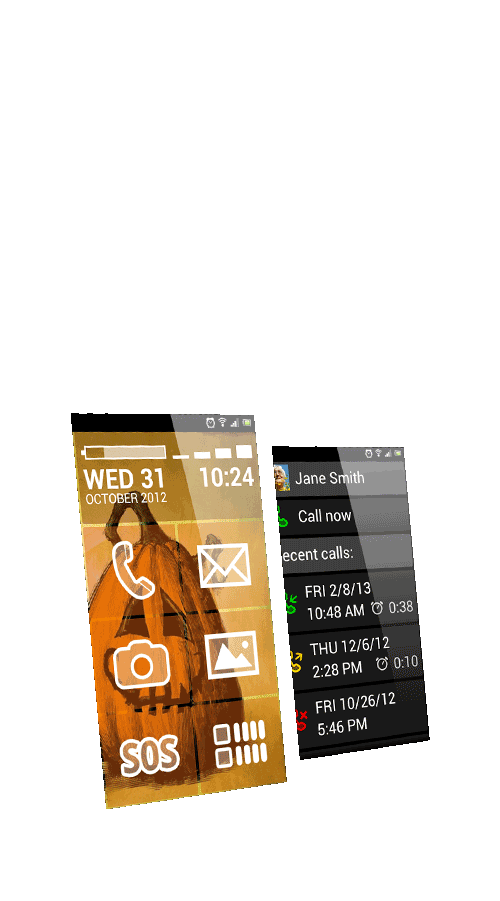
Fully. Add multiple screens, place contacts with photos, app shortcuts, or widgets on any button. Change the number of buttons per screen, rearrange the layout, pick a color theme — make it exactly what they need and nothing more.
Is there a free version to try first? +
Yes. All five BIG apps are free to download and try.
How much does BIG Launcher cost? +
BIG Launcher is free to try. Choose a monthly, yearly or lifetime plan for BIG Launcher through Google Play. Prices vary by country and currency, and Google Play confirms the exact final price before purchase. See current prices for one app and BIG Apps Suite PREMIUM.
What if we get stuck? +
There's a detailed user manual and step-by-step video guides — and you can always write to us. We reply ourselves, usually within a day.
A few things worth knowing before you download:
- BIG SMS shows photos and videos people send, but sends text only — for sharing photos, add WhatsApp to the home screen
- BIG Launcher runs on Android only — no iOS version
- The DTMF keypad (for automated phone menus) is a paid feature in BIG Phone — email us if you have questions
Make Android easier for an older parent
Practical setup tips for seniors, parents, and caregivers who want a calmer, easier phone experience.
How to make any Android phone easier for elderly parents
Step-by-step changes that improve readability, reduce confusion, and make everyday calling simpler.
Read the guideBest Android launcher for seniors (2026)
A practical comparison of three senior-friendly launchers and what matters when choosing one.
Read the guide5 signs your parent needs a simpler Android phone
Common warning signs families notice, plus sensible next steps to make the phone easier to use.
Read the guideGive Them Back Their World.
Downloaded more than 2 million times. No new phone. Just a phone that finally works for them.
“My father is almost completely blind due to macular degeneration … He can now text and call people again. His world has opened up again.”
— R Allen · Google Play review
Free download · No account needed · Works in 2 minutes